
Weighted average calculator
Enter each value with its weight to get the weighted average, the total weight and a step-by-step solution. It works for grades, GPA credits, stock prices and survey scores.

 By Catherine Risinger · Reviewed by Susan Simmons✓ Fact-checked
Paste two columns from Excel or Google Sheets, or type pairs like 88:30. The first number is the value, the second is the weight.
How to use the weighted average calculator
- 1Enter values and weights
Type each value with its weight, or switch to Paste and drop in two columns from a spreadsheet.
- 2Pick the weight type
Choose percent for grade weights, credits for GPA, or quantity for things like shares bought at different prices.
- 3Press Calculate
This panel switches to your weighted average, the total weight and the plain average for comparison.
- 4See what moved the result
The contribution bars and the step-by-step solution show how much each row added to the answer.
Step-by-step solution
What is a weighted average?
A weighted average is an average where some values count more than others. Each value gets a weight, and a bigger weight pulls the result closer to that value. A normal average gives every number the same weight.
Your final grade is the classic case. If the final exam is worth 50% of the course and a quiz is worth 10%, a good exam score moves your grade five times as much as a good quiz score. Statistics books call the same idea the weighted mean.
Weighted average formula
weighted average = Σ(x × w) / Σw
Here x is each value and w is its weight. Σ means “add them all up”. So you multiply each value by its weight, add those products, then divide by the total of the weights.
When the weights are percentages that add up to 100, the bottom of the fraction is 100, so you can also write it as:
weighted average = x₁w₁ + x₂w₂ + … + xₙwₙ
Write each weight as a decimal for this version, so 30% becomes 0.30. Both versions give the same answer.
How to calculate a weighted average
Four steps work for any weighted average:
- Write down each value and the weight that goes with it.
- Multiply each value by its weight.
- Add the products together, then add the weights together.
- Divide the sum of the products by the sum of the weights.
Weighted average example
A student scores 88 on homework worth 30%, 92 on a midterm worth 20% and 76 on a final worth 50%.
- 88 × 30 = 2,640
- 92 × 20 = 1,840
- 76 × 50 = 3,800
- Sum of products: 2,640 + 1,840 + 3,800 = 8,280
- Sum of weights: 30 + 20 + 50 = 100
- Weighted average: 8,280 / 100 = 82.8
A plain average of 88, 92 and 76 is 85.33. The weighted result is lower because the lowest score, the final, carries half the weight. Click “Class grades” in the calculator above to see this example worked out.
Weighted average vs simple average
A simple average adds the values and divides by how many there are. It assumes every value matters equally. A weighted average drops that assumption.
The two match when every weight is the same. They split apart when the big weights sit on values far from the middle. The calculator shows both numbers and the difference between them, so you can see how much the weights changed things.
Use a weighted average when the items are not equal in size or importance: course components, credit hours, shares bought in different amounts, or groups with different numbers of people.
Weighted average of percentages and grades
Grade weights are usually given as percentages of the course. Put your score in the value column and the percentage in the weight column, then set “Weights are” to Percent.
If you have not finished the course yet, your weights will add up to less than 100%. The calculator still gives your current weighted average for the work done so far and tells you how much weight is still to come.
For GPA, use grade points as values and credit hours as weights. Four courses with 4.0 (3 credits), 3.7 (4 credits), 3.0 (3 credits) and 3.3 (2 credits) give 42.4 / 12 = 3.53. The “GPA with credits” sample loads this example.
To average percentages that come from different totals, such as 45 out of 50 and 70 out of 100, weight each percentage by its total, or add the raw scores and divide by the total points. Both give the same result: 115 / 150 = 76.67%.
Weighted score for decisions and surveys
A weighted score ranks options against criteria that matter differently. Give each criterion a weight, score each option on each criterion, and take the weighted average for every option. The one with the highest weighted score wins.
Example: you rate a job offer 8 for pay (weight 5), 6 for commute (weight 2) and 9 for growth (weight 3). The weighted score is (40 + 12 + 27) / 10 = 7.9.
Survey results work the same way. For a 1 to 5 rating question, use each rating as the value and the number of people who picked it as the weight.
Weighted average price and cost
When you buy the same stock or product more than once at different prices, the average cost per unit is a weighted average. The price is the value and the quantity is the weight.
Buying 100 shares at $45.20, 50 shares at $48.75 and 150 shares at $42.10 costs $13,272.50 for 300 shares, so the weighted average price is $44.24 per share. A simple average of the three prices ($45.35) would overstate your cost because it ignores that you bought the most shares at the lowest price.
The weighted average cost method in inventory accounting uses the same math: total cost of goods available divided by total units. The weighted average return of a portfolio weights each holding’s return by how much money is in it.
Weighted average in Excel and Google Sheets
Excel has no single weighted average function, so combine SUMPRODUCT and SUM. With values in A2:A4 and weights in B2:B4:
=SUMPRODUCT(A2:A4, B2:B4) / SUM(B2:B4)
Google Sheets has a built-in function for it:
=AVERAGE.WEIGHTED(A2:A4, B2:B4)
You can also copy the two columns straight from either spreadsheet and paste them into the “Paste two columns” tab above to check your formula.
Why choose our weighted average calculator?
What you get with this free weighted average calculator:
- Rows add themselves as you type, so there is no fixed limit on how many values you can enter.
- Paste two columns from Excel or Google Sheets instead of typing every number.
- A bar for each row shows how much it added to the result, so you can see which weight matters most.
- The step-by-step solution uses your own numbers, from the products to the final division.
- A warning appears when percentage weights do not add up to 100%.
- Free to use
- No sign-up
- Step-by-step working
- Paste from Excel
- Works on mobile
Frequently asked questions
How do you calculate a weighted average?
Multiply each value by its weight, add the results, then divide by the sum of the weights. For 80 (weight 2) and 90 (weight 3): (160 + 270) / 5 = 86.
What is the weighted average formula?
Weighted average = Σ(x × w) / Σw, where x is each value and w is its weight.
Do the weights have to add up to 100?
No. The formula divides by the total weight, so weights of 2, 3 and 5 work just as well as 20%, 30% and 50%. Percent weights only need to reach 100 when you want a final course grade.
What is the difference between a weighted average and a normal average?
A normal average treats every value the same. A weighted average lets some values count more. If all the weights are equal, the two results are the same.
How do I find my weighted grade?
Enter each assignment or exam score as a value and its percentage of the course as the weight. The result is your current grade for the work entered.
Can a weight be zero or negative?
A weight of zero means that row is ignored. Negative weights are unusual and can give strange results, so the calculator shows a warning when it finds one.
How do you calculate a weighted average in Excel?
Use =SUMPRODUCT(values, weights) / SUM(weights). In Google Sheets you can also use =AVERAGE.WEIGHTED(values, weights).
Explore our other calculators



Our latest blogs
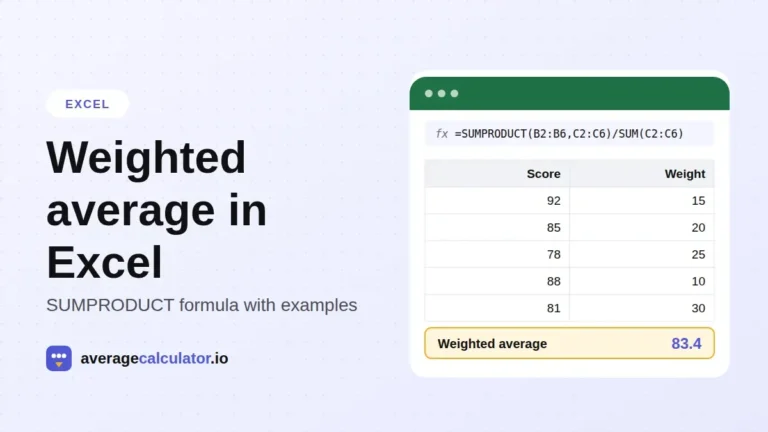
How to calculate a weighted average in Excel, with examples
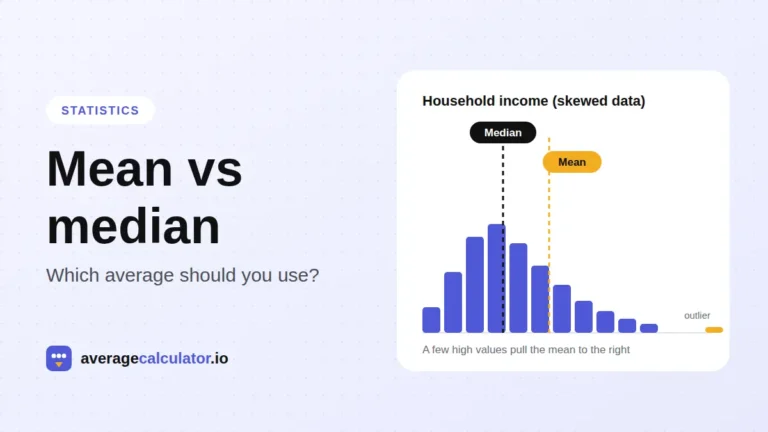
Mean vs median: which average should you use?
Who made this calculator
Spotted a mistake in this calculator? Tell us the numbers you used and what you expected, and we will check it.
Report an error